Table Aggregate
Render a table with aggregated data.
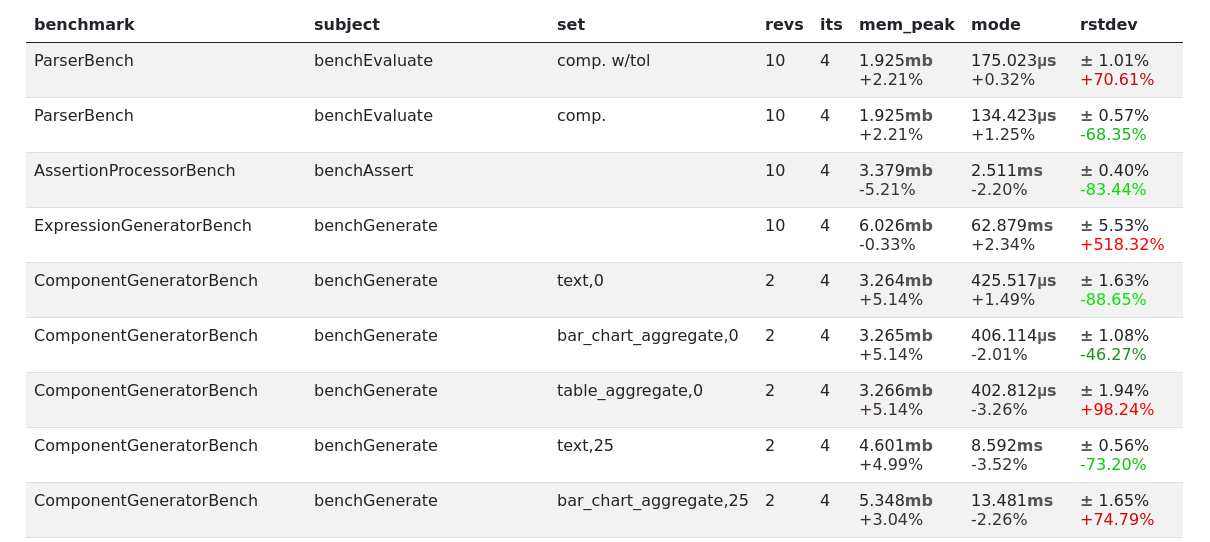
HTML output
Options
- title:
Type(s):
[string, null], Default:NULLCaption for the table
- partition:
Type(s):
[string, string[]], Default:[]Partition the data using these column names - the row expressions will to aggregate the data in each partition
- row:
Type(s):
array, Default:[]Set of expressions used to evaluate the partitions, the key is the column name, the value is the expression
- groups:
Type(s):
array, Default:[]Group columns together, e.g.
{"groups":{"group_name": {"cols": ["col1", "col2"]}}}
Example
Given the following configuration:
{
    "runner.path": "NothingBench.php",
    "runner.executor": "debug",
    "runner.env_enabled_providers": ["test"],
    "report.generators": {
        "nested": {
            "generator": "component",
            "title": "My Aggregated Table",
            "components": [
                {
                    "component": "table_aggregate",
                    "title": "Table",
                    "row": {
                        "benchmark": "first(partition['benchmark_name'])",
                        "net_time": "sum(partition['result_time_net'])"
                    }
                }
            ]
        }
    }
}
When we run PHPBench with the configured report above:
phpbench run --report=nested
Then it generates the following with the console renderer:
My Aggregated Table
===================

Table
+--------------+----------+
| benchmark    | net_time |
+--------------+----------+
| NothingBench | 10       |
+--------------+----------+
Advanced Columns
More advanced behavior can be accessed by passing an object instead
of an expression, specifying a “column processor” type.
expand
You can “expand” columns dynamically by further partitioning the data frame
with the expand column processor:
{
    "runner.path": "MultipleSubjects.php",
    "runner.executor": "debug-example",
    "runner.iterations": 5,
    "runner.executors": {
        "debug-example": {
            "executor": "debug",
            "times":[10, 20, 30, 40, 50],
            "spread": [4, 5, 2, 3]
        }
    },
    "runner.env_enabled_providers": ["test"],
    "report.generators": {
        "expanded": {
            "generator": "component",
            "components": [
                {
                    "component": "table_aggregate",
                    "title": "Table with rows per iteration",
                    "partition": "subject_name",
                    "row": {
                        "benchmark": "first(partition['subject_name'])",
                        "by_iteration": {
                            "type": "expand",
                            "partition": ["iteration_index"],
                            "cols": {
                                "Iteration #{{ key }}": "mode(partition['result_time_avg'])"
                            }
                        }
                    }
                }
            ]
        }
    }
}
Above we:
Use an object as the value of the column definition
by_iteration(the name is arbitrary and subsequently not used, it needs only to be unique)Specified the
typeto beexpandWe group (partition) the data by
iteration_index)Specify a set of columns
Which would produce:
Table with rows per iteration
+---------------+--------------+--------------+--------------+--------------+--------------+
| benchmark     | Iteration #0 | Iteration #1 | Iteration #2 | Iteration #3 | Iteration #4 |
+---------------+--------------+--------------+--------------+--------------+--------------+
| benchSubject1 | 14           | 25           | 32           | 43           | 54           |
| benchSubject2 | 14           | 25           | 32           | 43           | 54           |
| benchSubject3 | 14           | 25           | 32           | 43           | 54           |
+---------------+--------------+--------------+--------------+--------------+--------------+
Note that:
The
partitionparameter is used by default, overwriting the partition from the parent scope. You can rename this using thevaroption.The
keyvariable is made available representing the “key” of the partition, you can rename this variable with thekey_varoption.